In this article
- What is the best MacBook for different needs?
- Best MacBook for professionals
- Best MacBook for students
- Best MacBook for personal use
- How can you compare MacBook Air and Pro effectively?
- Performance differences
- Price differences
- Feature comparison
- What is the best MacBook for video editing?
- MacBook Pro for video editors
- MacBook Air for video editors
- Benefits of M1 and M2 for editing
- MacBook Air or Pro: Which should designers choose?
- Graphics performance analysis
- Display comparison
- Software requirements
- Which MacBook offers the best value for money?
- Entry-level models
- Price and performance analysis
- Storage options
- What are the best Apple laptops in 2023?
- Main models launched in 2023
- Innovations and new features
- Expert recommendations
- Which MacBook is recommended for university students?
- Most affordable models
- Performance needed for studying
- Battery and portability options
- Which launch year is the best MacBook?
- Comparisons between years
- Hardware evolution
- Latest technology options
- Which MacBook is ideal for work and productivity?
- Best MacBook for offices
- Productivity-focused features
- Processor analysis
- Comparison between MacBook Air M1 and M2: Which should you choose?
- Advantages of the M1
- Advantages of the M2
- Performance and battery differences
- MacBook Pro M1 vs. M2: Which is better?
- Which MacBook has the best battery life?
- Battery life comparison
- Real-world use tests
- Models with the longest battery life
- Which MacBook is the best option for travel?
- Lightweight and portable models
- Features for mobile work
- Battery capacity while travelling
- MacBook for photo editing: Which should you choose?
- Advantages of the MacBook Air
- Advantages of the MacBook Pro
- Graphics performance analysis
- Which MacBook offers the best value for money in 2023?
- Most sought-after models
- Price comparison
- Performance and feature analysis
- Conclusion
- Read also

- Best for professionals: MacBook Pro (M3, M3 Pro, M3 Max chips), up to 192 GB of memory.
- Best for students: MacBook Air (M2, M3 chips), lightweight, long battery life, 13" and 15.3" sizes.
- Best for personal use: MacBook Air, portable, good screen, great for browsing and light tasks.
- Air vs Pro comparison:
- Performance: Pro for heavy tasks; Air for daily tasks.
- Price: Air is more affordable.
- Features: Air is more portable; Pro has a better screen and more ports.
- Video editing: MacBook Pro (ideal), MacBook Air (light edits).
- Designers: Pro for graphics performance; Air for portability.
- Value for money: MacBook Air 13" (M2/M3) offers a good balance of price and performance.
- Battery life: Air (up to 18h); Pro (varies with use).
- For travel: MacBook Air (lightweight, long battery life).
- Photo editing: Pro for maximum performance; Air for common tasks.
- Recommended year: M3 models (2023) with the best hardware and battery advances.
What is the best MacBook for your needs? If you are a fan of Apple products, you know that choosing the right MacBook can be difficult. In this article, I will help you find out which model is best for work, study or personal use. Let’s explore the options and find the perfect MacBook for you!
What is the best MacBook for different needs?
Best MacBook for professionals
For work, the MacBook Pro is the strongest option. It comes in several sizes and has powerful chips, such as the M3, M3 Pro and M3 Max. If you need a lot of memory, up to 192 GB, the MacBook Pro is ideal. Heavy tasks, such as video editing or programming, run smoothly. Want more details? See the full analysis in this article.Best MacBook for students
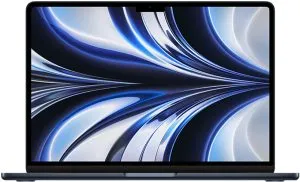
Students will love the MacBook Air. It is light, easy to carry in a backpack, and has excellent battery life. With the M3 or M2 chip, it is fast for daily tasks and online classes. The 13" MacBook Air is compact, while the 15.3" model gives you more screen space. An investment for many years of study.Best MacBook for personal use
If you need a MacBook to use at home or while travelling, the MacBook Air is an excellent option. It is portable and has a beautiful 13.6" screen. The new MacBook Air M3 has incredible graphics and ray tracing technology. Watching films, browsing the web or light photo editing are tasks it handles brilliantly. For more information and comparisons, you can check out this dedicated article for more insights.How can you compare MacBook Air and Pro effectively?
Performance differences
Performance is crucial when choosing between MacBook Air and Pro. If you need a lot of power, the MacBook Pro is better. It offers several configurations, even with an M3 Pro or M3 Max processor. These chips have more CPU and GPU cores and handle demanding work well, such as video editing and heavy programming. On the other hand, the MacBook Air performs well for daily tasks, such as browsing the internet, watching videos and office work. If your activities do not require so much power, the MacBook Air can be a great choice with M2 or M3 processors, which also offer good performance.Price differences
Price is another significant difference between MacBook Air and Pro. Historically, the MacBook Air is more affordable. If you are on a limited budget, you will probably prefer the Air. It offers excellent value for students and professionals who perform simpler tasks. The MacBook Pro, with its advanced configuration options, can be much more expensive. The investment pays off if you need that extra performance for computationally intensive work.Feature comparison
When we talk about features, both Air and Pro have unique benefits. The MacBook Air can have a screen of up to 15.3 inches, light and thin, ideal for anyone who needs portability. It also has the famous extended battery life. However, the MacBook Pro shines with its superior mini-LED screen and multiple Thunderbolt 4 ports. It also offers more RAM and storage, and up to 192GB of unified memory. If you need a high-quality screen and connection versatility, the Pro is the right choice. If mobility and simplicity are priorities, the Air does the job well. So, depending on your needs, you will choose between performance, price and features. Knowing exactly what you need is essential to making the right choice.What is the best MacBook for video editing?
If you are a video editor, you need a powerful machine. The MacBook Pro is the best option. It is built for heavy tasks.MacBook Pro for video editors
The MacBook Pro has the best performance for editing. It comes with M3, M3 Pro and M3 Max processors. These chips are incredible for video editing. Each model has up to 24 GPU cores and 192 GB of unified memory. The screen ranges from 13 to 16 inches, all with high resolution. The MacBook Pro also offers up to 8 TB of storage, vital for large video files.MacBook Air for video editors
The MacBook Air can work for lighter edits. It is great for short videos and less complex tasks. The 13-inch MacBook Air comes with an M2 processor. Its 13.6-inch Liquid Retina screen offers good image quality. The 15-inch model with M3 is another option, but still not as powerful as the Pro.Benefits of M1 and M2 for editing
The M1 and M2 chips brought major improvements. The M2 chip, for example, has up to 10 GPU cores, compared with 8 on the M1. It also has better energy efficiency. This means more speed and lower battery consumption. For video editing, an M2 chip can handle multiple layers of effects more easily. The M1 chip is still great, especially for work that does not require so much power. With these options, choosing the right one depends on your needs. If you work with complex editing, go for the MacBook Pro. For less intensive tasks, the MacBook Air is sufficient and cheaper.MacBook Air or Pro: Which should designers choose?
Graphics performance analysis
The MacBook Air with the M3 chip offers good graphics options, but the MacBook Pro stands out. With a GPU of up to 24 cores, the MacBook Pro is ideal for designers working with animations and visual effects. Even the MacBook Air M3 with a 10-core GPU does not come close. If you need advanced graphics performance, the Pro is the best choice.Display comparison
Displays are important for designers. The MacBook Air has a 13.6 or 15.3-inch screen with Liquid Retina. The MacBook Pro, however, offers sizes from 13 to 16 inches with mini-LED, which greatly improves contrast and colour. In addition, the Pro’s refresh rate is superior, reaching 120 Hz. For a superior visual experience, the Pro wins.Software requirements
Designers use heavy software such as Adobe Creative Suite and AutoCAD. The processing capacity of the MacBook Pro, with up to 192 GB of unified memory, is essential for running demanding programs without crashes. The MacBook Air is suitable for less intensive tasks, but has limitations. Consider your needs before deciding. For more details on which MacBook to buy, check here.Which MacBook offers the best value for money?
Entry-level models
If you want a good MacBook without spending too much, entry-level models are ideal. The MacBook Air 13" (M2) is a great choice. It comes with a 13.6" Liquid Retina screen and an Apple M2 processor. This processor has impressive performance with an 8-core CPU and up to 10 GPU cores. If you need a larger screen, you can choose the MacBook Air 15". It has a larger 15.3" screen, but with the same M2 performance. Both are light and easy to carry.Price and performance analysis
The MacBook Air has an excellent balance of price and performance. Compared with more expensive Macs, such as the MacBook Pro, you notice the difference in your wallet. The MacBook Air with M2 costs less, but still offers plenty of power. Its Liquid Retina screen is clear and sharp. The battery lasts all day, which is crucial for work or study. If you want something good without spending too much, the MacBook Air is a wise choice. See more details here.Storage options
Storage is also important. Entry-level models start at 256 GB. That is enough for many users, but perhaps not for everyone. If you need more space, you can pay a little more and get 512 GB or even 1 TB. Remember, more space means more photos, videos and apps without worrying. For someone who stores lots of large files, the larger storage option is worth it. But if you use cloud storage, you may not need so much internal space.What are the best Apple laptops in 2023?
Main models launched in 2023
The highlighted models are MacBook Air M3 and MacBook Pro M3. Both have Liquid Retina displays. The MacBook Air M3 is available in 13.6" and 15.3" sizes. The MacBook Pro M3 offers 13", 14" and 16" options. The biggest difference is in the processors. The MacBook Air M3 has an M3 processor with an 8-core CPU and up to 10 GPU cores. The MacBook Pro M3 goes further, with versions featuring M3 Pro and M3 Max processors, which can have up to 24 GPU cores and up to 192 GB of unified memory. In addition to portable models, there are desktops such as iMac and Mac Mini. They vary in performance and size. iMacs can have 27" Retina displays and Intel Core i9 processors. Mac Minis can come with M2, M2 Pro, or even Intel processors. For extreme performance, we have Mac Studio and Mac Pro, with CPUs of up to 24 cores and GPUs of up to 76 cores. Storage options go up to 8 TB.Innovations and new features
The biggest innovation of 2023 is Apple’s M3 processor, which improves performance and efficiency. The M3 brings hardware-accelerated ray tracing, which improves graphics rendering. These chips allow intensive tasks such as video editing and graphic design to run effortlessly. There are also display innovations. The models have Liquid Retina screens, which offer vivid colours and high resolution. This is ideal for professionals working with digital media. In terms of portability, the MacBook Air remains the lightest and thinnest. But the MacBook Pro offers long battery life and power for heavier work.Expert recommendations
For general use and students, I recommend the MacBook Air M3. It is light, performs well and is more affordable. The 13.6" screen is ideal for carrying in a backpack. If you need a larger screen, choose the 15.3" model. For professionals who need more power, the MacBook Pro M3 is the best choice. It handles heavy tasks such as video editing, software development and graphic design well. Choose the 14" or 16" MacBook Pro with an M3 Pro or M3 Max processor for maximum features. For those who prefer desktops, the iMac with a 27" Retina screen is an excellent choice. It is perfect for work that needs a large screen. Mac Studio is recommended if you need extreme performance. With capacities of up to 192 GB of memory, it can handle any task. For more information on the new Apple laptop launches in 2023, you can access our complete guide.Which MacBook is recommended for university students?
Most affordable models
If you are a university student, cost matters a lot. I recommend the 13" MacBook Air M2. It is a cheaper option but still performs well. Another good choice is the 13" MacBook Air M1. Both are reasonably priced and meet the needs of most students well.Performance needed for studying
For studying, you need a laptop that works well for daily tasks. The MacBook Air M2 has a great processor with eight cores. This lets you run several programs at the same time without freezing. The MacBook Air M1 is also good, but the M2 offers a little more performance for intensive tasks such as light video editing or programming.Battery and portability options
Students often need to carry their laptops from one place to another. The MacBook Air M2 is an excellent choice because it is light and has long battery life. It weighs just over 1 kg and the battery lasts up to 18 hours. That is enough for a full day of classes and studying without worrying about charging. The MacBook Air M1 is also light and has an excellent battery that lasts up to 15 hours. For more information on the best MacBook to buy in 2023, check this link.Which launch year is the best MacBook?
Comparisons between years
When we think about "which is the best MacBook launch year, 2022," we have to consider many things. In 2022, Apple introduced the MacBook Air with the M2 chip and a 13.6-inch Liquid Retina screen. This model is excellent for daily tasks and stands out for its processing power and energy efficiency. Models from previous years also have their strengths. The MacBook Air with M1 chip, for example, launched in 2020, is still a great device. It offers impressive performance and has incredible battery durability. Anyone on a tighter budget can still get great value with this model.Hardware evolution
Hardware evolution is crucial in determining the best launch year. Since 2020, with the introduction of M1 chips, Apple has brought a revolution in performance and efficiency. In 2021, the MacBook Pro received the M1 Pro and M1 Max chips, which raised the bar for demanding professionals. In 2022, the launch of the M2 chip was a leap over the M1, further improving the user experience. With improved graphics and more power, the MacBook Air with M2 is a solid choice for many people. The M3 series, launched this year, promises significant advances, further consolidating Apple’s leadership in hardware technology.Latest technology options
For anyone looking for the latest technology options, the 2023 MacBook Air and MacBook Pro are favourites. They come equipped with the M3 chip, which offers an 8-core CPU and up to 10 GPU cores. Support for hardware-accelerated ray tracing technology is also an exciting new feature. In addition to the chip, the Liquid Retina screen remains a draw, providing vivid colours and sharp details. For anyone who needs a larger screen, the 15-inch MacBook Air with M3 is an excellent option. It offers extra space to work without compromising portability. Determine your priorities: performance, budget or new technologies? Each launch year has something special to offer. If you want to explore more about these models, visit the official Apple MacBook Air page.Which MacBook is ideal for work and productivity?
Best MacBook for offices
For office workers, the 13" MacBook Air (M2) is an excellent choice. It has a 13.6" Liquid Retina screen and robust processing with its 8-core CPU Apple M2 processor. This model is light and easy to carry, ideal for anyone who needs to work in different locations around the office. The battery can last all day, so there is not much need to recharge frequently.Productivity-focused features
If productivity is the focus, the MacBook Pro is unbeatable. The 14" and 16" MacBook Pro models come with several processor options, up to the M3 Max. This offers up to 24 GPU cores and 192 GB of unified memory. These specifications ensure work flows without interruptions, even with several simultaneous tasks. Another point is battery life, which is one of the best on the market, and the storage options, which can reach up to 8 TB, meaning plenty of space for documents and projects.Processor analysis
Choosing the right processor is essential. The MacBook Air with M3 offers more power than its predecessors and a larger screen with a 15.3" screen. However, if the work involves heavier tasks, such as video editing or 3D modelling, the MacBook Pro with M3 Max is a superior choice. It delivers extreme performance that no other laptop in the range offers. Choosing the right processor depends entirely on your work needs. For less intensive tasks, the M2 may be enough, while heavy graphics work benefits from the M3 Pro or M3 Max. For more details on the different models and their specifications, check this link to help choose the ideal one for your work context.Comparison between MacBook Air M1 and M2: Which should you choose?
Choosing between the MacBook Air M1 and M2 is not easy. Each has unique advantages. In this section, I will highlight key points to help you decide which is best for you based on your needs.Advantages of the M1
The MacBook Air M1 stands out for its incredible value for money. It is cheaper than the M2, but still offers great performance. Its M1 chip has an 8-core CPU and a GPU of up to 8 cores. This enables excellent performance for daily tasks and even some heavier activities. The M1 battery life is also notable. In typical use, it can last up to 18 hours. This makes it ideal for long work or study sessions without needing to recharge. Another strong point is the M1’s superior thermal efficiency. It runs cooler, reducing the need for active ventilation. This results in a quieter laptop, good for anyone who prefers a less noisy environment.Advantages of the M2
The MacBook Air M2 brings significant improvements in several areas. The new M2 chip has an 8-core CPU and a GPU of up to 10 cores. It is faster in performance benchmarks, making it ideal for more demanding tasks. The M2 screen is another strong point. The MacBook Air M2 comes with a 13.6-inch Liquid Retina screen. It offers more accurate colour reproduction and improved brightness, making use more comfortable for the eyes. The M2 battery life is very good, with up to 17 hours of standard use. Although slightly less than the M1, this should not be a problem for most users. In addition, the M2’s newer, thinner design is an extra attraction for anyone who values aesthetics and portability.Performance and battery differences
Overall, both models are very capable. In terms of performance, the M2 has the advantage, especially in tasks that require more graphics processing. This includes video editing and light gaming. If you need a MacBook for common tasks such as browsing the internet, editing documents and media consumption, either one will serve you well. As for the battery, although the M1 offers a slight advantage, the difference is not that big. Both allow a full day of use without worries. Therefore, the choice between one model and the other may depend more on other preferences such as design, new features and, of course, budget. Checking the Apple website can provide additional information and help with the final choice.MacBook Pro M1 vs. M2: Which is better?
Performance in heavy tasks
If you want the strongest option, look at the MacBook Pro M2. It performs better in heavy tasks. The M2 chip is faster than the M1 and that makes a difference. For video editing or 3D rendering, the M2 is the best. The M1 is good; do not get me wrong. But if you compare both, the M2 wins. It is more efficient and can handle more processes at the same time. For those working with large projects, the M2 is essential.Battery durability
On this point, both are great. But the M1 is still a little better. The M1 lasts longer on one charge. This is important for anyone who travels a lot or works in places without many sockets. The M2 is also very good, but it consumes a little more power. Even so, it offers a battery that lasts a full working day. For light tasks, both can last a long time.Storage and memory options
The MacBook Pro M2 has more memory and storage options. It can be configured with up to 24 GB of RAM and 2 TB of storage. This is perfect for anyone who needs extra space and speed. The M1 also has good options, but it is a little more limited. You can get up to 16 GB of RAM and 2 TB of storage. This already meets the needs of many people and many use cases. For anyone who will not give up maximum performance and space, the M2 is the best choice. If you are fine with a little less, the M1 is still excellent and can save some money. Comparing these two models helps you choose the best one for your needs. Read more about the specifications on the Apple website and see what makes most sense for you.Which MacBook has the best battery life?
Battery life comparison
If you are wondering which MacBook has the best battery life, let’s start with a quick comparison. Overall, the MacBook Air has superior battery life compared with the MacBook Pro, especially in the latest models. The MacBook Air 13" models (M2 and M3) can last up to 18 hours of continuous use. The MacBook Air 15" (M3), meanwhile, manages a little less, with up to 17 hours. By contrast, the MacBook Pro 13" (M2) also offers up to 20 hours of battery life, but its larger siblings, such as the MacBook Pro 16" (M3 Max), can maintain this figure, with variations depending on use.Real-world use tests
To understand better, it is important to look at real-world use tests. Various specialist websites run these tests, assessing web browsing, document editing and video streaming. In these areas, the MacBook Air 13" (M2 and M3) stands out by maintaining an average of 17 to 18 hours, while the MacBook Pro 13" (M2) can reach 19 hours in light use cases. We need to consider the type of task. If you perform intensive tasks, such as video editing or graphic design, the charge may last less. For example, under intense use, the MacBook Pro 16" (M3 Max) maintains around 14 to 16 hours, thanks to its powerful hardware. Always check battery performance in real scenarios to decide the best model for you.Models with the longest battery life
Now, I have listed the models with the longest battery life for different needs:- MacBook Air 13" (M2 and M3): Can last up to 18 hours. Ideal for daily tasks and users who need a lightweight laptop with excellent battery life.
- MacBook Pro 13" (M2): Up to 20 hours of battery life. Best for demanding professionals and students looking for balanced performance between power and longevity.
- MacBook Pro 16" (M3 Max): Lasts around 14 to 16 hours under intense use. Essential for professional users who need maximum power, especially in graphics tasks.
Which MacBook is the best option for travel?
Lightweight and portable models
The best MacBook for travel should be light and easy to carry. The MacBook Air 13" (M3) is great for this. It weighs just 1.24 kg, making it ideal to carry in a backpack or suitcase. Its 13.6-inch screen is perfect for use in small spaces, such as a plane or train. If you prefer a larger screen, the MacBook Air 15" (M3) offers more viewing space while remaining light and portable.Features for mobile work
When travelling, it is essential that the MacBook has features for mobile work. The MacBook Air (M3) has a latest-generation M3 processor with an 8-core CPU and a GPU of up to 10 cores. This ensures you can carry out heavy tasks such as photo and video editing or multitasking without problems. In addition, its fast SSD storage lets you access files and applications quickly.Battery capacity while travelling
The battery is crucial on long journeys. The MacBook Air (M3) offers up to 18 hours of use, which is more than enough for most international flights. Even on the 15" (M3) model, battery life is impressive, reaching 17 hours. If you need to work for long periods without access to sockets, these MacBooks are reliable and will not let you down. Choosing the right MacBook for travel means balancing weight, performance and battery life. The MacBook Air (M3), with its 13" or 15" screen options, stands out as the ideal choice, offering portability and processing power for your needs on the move.MacBook for photo editing: Which should you choose?
Advantages of the MacBook Air
If you are looking for a MacBook for photo editing, the MacBook Air may surprise you. It gained prominence with the M2 and M3 versions, each of which has real improvements. The MacBook Air 13" (M2) offers a processor with 8 CPU cores and up to 10 GPU cores, perfect for smooth photo editing. The 13.6" Liquid Retina screen is vibrant, ideal for viewing details. The newest MacBook Air 13" (M3) and MacBook Air 15" (M3) have even more powerful configurations with a GPU of up to 10 cores and hardware-accelerated ray tracing, which benefits graphics and lighting work in photos. For designers who need a larger screen, the 15.3" model is a great choice.Advantages of the MacBook Pro
When we talk about MacBook for designers, the MacBook Pro is a solid choice. It differs mainly in performance. The models range from 13" to 16" and include M3, M3 Pro and M3 Max processors. These chips offer options with up to 24 GPU cores and up to 192 GB of unified memory. This power is crucial for complex edits and intensive multitasking. The MacBook Pro screen also deserves attention. Its Retina quality is unbeatable, offering the best colour fidelity for design work. In addition, the ProMotion feature adjusts the refresh rate up to 120Hz, making scrolling and editing smoother. If you are looking for precision and maximum performance, the MacBook Pro is the choice.Graphics performance analysis
Graphics performance is essential when choosing a MacBook for photo editing. With M2 and M3 processors, both MacBook Air and Pro offer powerful GPUs. In the MacBook Air, you get the versatility of up to 10 cores. In the MacBook Pro, there are options offering up to 24 GPU cores, essential for manipulating high-resolution images and intensive software. The MacBook Pro also incorporates more robust unified memory, supporting up to 192 GB. This is important for editing work that requires handling large files and quickly opening multiple applications. For designers who use software such as Adobe Photoshop and Lightroom, this extra capacity can be crucial. For those who need a lightweight tool, the most practical and efficient choice is the MacBook Air. However, for maximum performance and advanced features, the MacBook Pro is unbeatable. After all, each type of user will have a "best" MacBook, depending on their specific photo editing needs.Which MacBook offers the best value for money in 2023?
Most sought-after models
When we talk about value for money, the MacBook Air 13" (M3) is a favourite. It has a 13.6" Liquid Retina screen and an Apple M3 processor with an 8-core CPU and a GPU of up to 10 cores. Another highly sought-after model is the MacBook Air 13" (M2), with a similar screen and processor, but with the M2 chip. Of course, the MacBook Air 15" (M3) is not far behind either, offering a larger 15.3" screen with the same M3 chip. These models have notable features at a more affordable price compared with the MacBook Pro.Price comparison
Let’s talk about prices: the MacBook Air 13" (M3) costs less than the Pro models. Why? Because it is focused on general use and daily productivity. The 13" (M2) is also economically viable, being a little cheaper than the new model (M3). The MacBook Air 15" (M3), being larger, has a slightly higher price, but is still a balanced option. Exame lists great discounts, especially during promotional periods such as Black Friday.Performance and feature analysis
In terms of performance, the MacBook Air 13" (M3) shines with its new M3 chip, allowing simultaneous tasks without freezing. The M3 brings hardware-accelerated ray tracing, ideal for anyone who needs better graphics performance. The MacBook Air 13" (M2), although not as powerful as the M3, still offers excellent performance for daily use. The Liquid Retina screen on these models provides vivid and detailed colours, with True Tone technology that adjusts the screen’s white balance according to ambient lighting. For more demanding tasks, such as photo or video editing, the Pro models are generally recommended, but the cost is significantly higher. Therefore, for a regular user or student who wants good performance at a fair price, the MacBook Air 13" (M3) stands out as the best value choice. If you are looking for something more balanced between price, performance and features, the MacBook Air 15" (M3) may be worth it for the screen size, although with a slight increase in cost. Browse the options and choose according to your daily usage needs and available budget.Conclusion
You now know which MacBook to choose for each need. We have looked at options for professionals, students and personal use. We compared MacBook Air and Pro, and discussed the best option for video editing, design and value for money. We also talked about 2023 launches and comparisons between M1 and M2. iOutlet offers all these models with the best support and security. It is time to make an informed choice and secure your next MacBook with us.Read also
- MACBOOK AIR, PRO OR IMAC: which Apple computer is right for me?
- Should I buy a desktop? Discover the advantages and disadvantages of the iMac!
- Which MacBook to buy in 2023
- View refurbished MacBooks at iOutlet
Get more articles like this one.
Refurbished tech analysis + €5 with BEMVINDO5 on your first order.