
TL;DR:
- Materials: soft cloth, 70% isopropyl alcohol, 75% ethanol, Clorox wipes. Avoid bleach/hydrogen peroxide.
- Methods: dry cloth for dust, cloth dampened with alcohol for stubborn dirt. Use a small brush or compressed air between the keys.
- Screen: soft cloth, 70% isopropyl alcohol, 75% ethyl alcohol. Avoid acetone, ammonia, direct sprays.
- Safety: MacBook switched off, avoid liquids in openings, use damp wipes (not soaked).
- Frequency: keyboard and screen weekly if used daily, every two weeks if used less.
- Products: recommended commercial solutions; homemade water and vinegar solution (1:2) for general cleaning.
In this article
- How to clean a MacBook keyboard?
- Which materials should you use to clean the keyboard?
- What are the correct cleaning methods?
- How to clean a MacBook screen?
- Which products are safe for cleaning the screen?
- What is the procedure to avoid marks?
- Which products should you use to clean a MacBook?
- How to choose the right cleaning cloth?
- Isopropyl alcohol: pros and cons
- How to remove stubborn dirt from the keyboard?
- Using isopropanol for stubborn dirt
- Mechanical cleaning methods
- How to avoid damage while cleaning a MacBook?
- What are the main precautions when cleaning?
- Which products should you avoid?
- What are the safety tips for cleaning a MacBook?
- Essential tips for safe cleaning
- Avoiding scratches and marks on the screen
- What is the ideal cleaning frequency for a MacBook?
- Defining the ideal cleaning frequency
- Benefits of keeping the device clean regularly
- Practical cleaning tips
- Which cleaning solutions are recommended?
- Developing your own cleaning solution
- Comparison between commercial and homemade solutions
- Conclusion
- Read also
Do you want to keep your MacBook looking clean and new? Let’s get straight to the point! In the article “How to clean a MacBook keyboard and screen?”, I’ll show you the best ways to do it step by step. Learn which materials to use, the correct methods and everything else you need for a spotless MacBook. Shall we get started? Your MacBook will thank you!
How to clean a MacBook keyboard?
Which materials should you use to clean the keyboard?
To clean your MacBook keyboard, you need a few basic materials. Use a soft, lint-free cloth. These cloths are great for removing dirt and dust without scratching.
You will also need 70% isopropyl alcohol, 75% ethanol, or Clorox disinfectant wipes. Never use bleach or hydrogen peroxide, as they can damage the keyboard. Remember to switch off your MacBook and disconnect all cables before you start cleaning.
What are the correct cleaning methods?
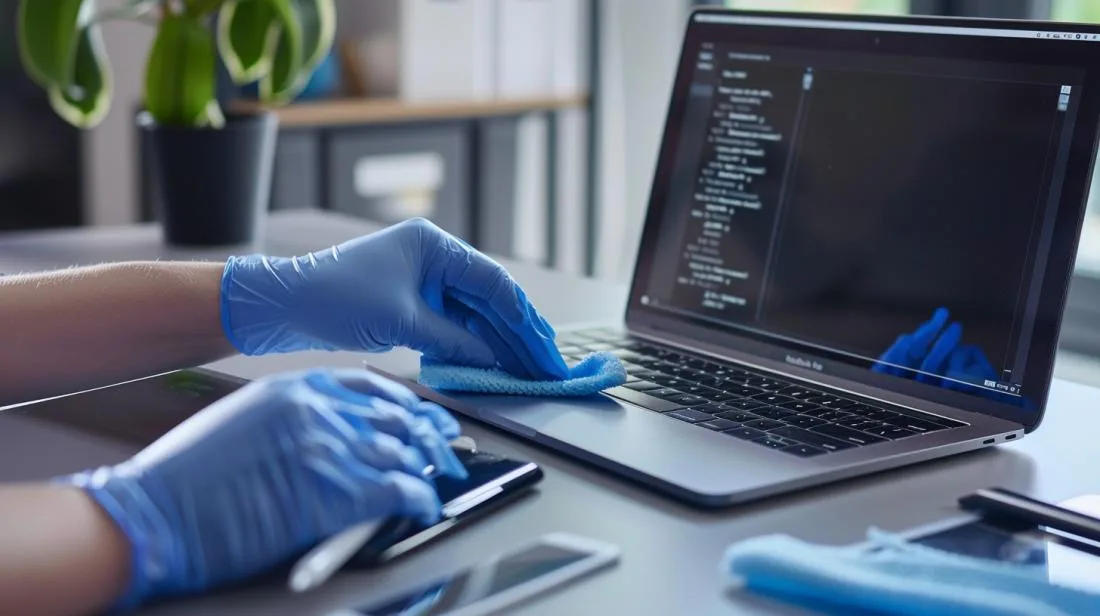
First, wipe the keyboard with a soft, dry cloth. This removes surface dust. For stubborn dirt between the keys, use a small brush.
Take your soft cloth and lightly dampen it with isopropyl alcohol. Carefully wipe between the keys. Avoid making the cloth too wet so liquid does not drip into the keyboard. Use this Apple support page as a guide.
If you need to disinfect, use isopropyl alcohol or Clorox wipes. Gently wipe over the keys, avoiding any excess liquid. Never spray directly onto the keyboard.
For models with Touch Bar and Touch ID, use the same method. However, take extra care not to damage the sensors and touchscreen.
By following these tips, you ensure efficient and safe cleaning for your MacBook.
How to clean a MacBook screen?
Which products are safe for cleaning the screen?
For safely cleaning your MacBook screen, use a soft, lint-free cloth. Choose specific solutions, such as wipes with 70% isopropyl alcohol or 75% ethyl alcohol. These products are safe for hard, non-porous surfaces and effective for disinfection. Avoid products containing acetone, bleach or hydrogen peroxide. Never use abrasive products, aerosol sprays or cleaning products directly on the screen, as they can damage the screen coating.
What is the procedure to avoid marks?
To avoid marks on your MacBook screen, follow these steps. First, switch off your MacBook and disconnect all cables and chargers. Use a soft cloth dampened with a little water or isopropyl alcohol. Clean the screen gently, without applying too much pressure so you do not cause damage. Always dry the screen with a dry, lint-free cloth to avoid leaving marks.
As mentioned on Apple support, do not let liquids enter the openings of your MacBook. Also, avoid cleaning the screen too often to preserve the durability of the coating. Follow these steps and use suitable products to keep your screen clean and free from marks.
Which products should you use to clean a MacBook?
To clean my MacBook, I always choose safe products. Let’s see what they are.
How to choose the right cleaning cloth?
A good cloth is soft and lint-free. I use a microfibre cloth. It cleans well and does not scratch the screen. Always avoid rough cloths or paper towels. They can scratch your MacBook.
Isopropyl alcohol: pros and cons
Isopropyl alcohol is great for cleaning a MacBook, but it requires care. You should use alcohol at 70% or less. It cleans difficult marks. It removes germs and evaporates quickly. But never use alcohol near the openings. It can damage internal components. And remember, always use a small amount.
For more information about safe products, visit Apple Support.
How to remove stubborn dirt from the keyboard?
Using isopropanol for stubborn dirt
To remove stubborn dirt from the keyboard, use 70% isopropyl alcohol. Isopropyl alcohol is ideal because it evaporates quickly and cleans well. First, switch off your MacBook and disconnect everything. Take a clean, soft cloth, lightly dampened with the alcohol.
Carefully wipe the cloth over the keyboard. Do not leave the cloth too wet, to prevent liquid from entering the MacBook. Focus on the dirtiest areas, but do not press too hard so you do not damage the keys. For tougher dirt, dampen a cotton bud with isopropyl alcohol and clean between the keys.
Mechanical cleaning methods
Another useful technique is mechanical cleaning. Use a soft-bristled brush or a clean make-up brush. This helps remove dust between the keys without damaging them. Keep the MacBook tilted so the dirt falls out easily.
For a deeper clean, you can use compressed air. Hold the compressed air can at an angle and spray between the keys in short bursts. This will ensure there is no dust trapped underneath the keys.
Remember that using liquids or abrasive methods can cause damage. Always avoid hard materials and sprays directly on the keyboard. For more MacBook keyboard cleaning suggestions, see Apple’s guides. They offer best practices and help prevent damage to your device.
How to avoid damage while cleaning a MacBook?
What are the main precautions when cleaning?
When cleaning your MacBook, you need to take some precautions to avoid damage. First, switch off your MacBook and disconnect all cables and accessories. Always use a soft, lint-free cloth. A microfibre cloth is ideal, as it does not scratch the surface. Avoid rough cloths or those that may leave residue.
When cleaning, never apply excessive force. This can damage delicate materials. Also, do not use any type of liquid directly on the device. Dampen the cloth with water and then wipe the MacBook, avoiding the openings.
Keeping liquids away from the MacBook is vital. Liquids can enter through the openings and damage the internal components. Do not let moisture enter the ports or other small openings.
Which products should you avoid?
To avoid damage, some cleaning products must be avoided. Never use abrasive products, such as steel wool or hard cloths. They can scratch surfaces. It is also important not to use products containing acetone, ammonia or abrasive materials.
Chlorine-based disinfectants or hydrogen peroxide are not recommended. These products can cause unwanted chemical reactions and damage the MacBook coating. Prefer wipes dampened with 70% isopropyl alcohol or, at most, wipes with 75% ethyl alcohol. Both are safe for non-porous surfaces.
If you need to disinfect, avoid submerging the product in liquids. This can cause internal damage. The wipes should only be damp, never soaked. Following this advice will prevent damage and ensure your MacBook stays in excellent condition.
What are the safety tips for cleaning a MacBook?
Essential tips for safe cleaning
First, switch off and unplug your MacBook. This prevents electric shocks and electrical damage. Use a soft, lint-free cloth. Microfibre cloths work well. Do not use abrasive cloths. Also avoid paper towels.
Do not make the cloth too wet. A slightly damp cloth is enough. Excess water can enter the openings and damage the MacBook. Keep liquids well away from the openings of your device.
When disinfection is necessary, use wipes with 70% isopropyl alcohol. 75% ethyl alcohol wipes also work. These products do not damage non-porous surfaces.
Never use products such as bleach or hydrogen peroxide. They can harm your MacBook. Also, do not spray cleaning products directly onto the screen or keyboard.
Avoiding scratches and marks on the screen
The MacBook screen is sensitive and needs special care. To avoid scratches, always use a soft cloth. Microfibre cloths are an excellent choice. Wipe gently, without applying too much pressure.
Never use cleaning products with acetone or ammonia. They can damage the screen coating. If the screen is very dirty, use a cloth lightly dampened with water. For stubborn marks, a little isopropyl alcohol can be used.
Remember never to use spray products directly on the screen. Dampen the cloth first and then clean the screen carefully. This helps prevent the product from entering the openings.
By following these tips, you keep your MacBook clean and free from scratches. Protect your investment with careful and safe cleaning.
What is the ideal cleaning frequency for a MacBook?
Defining the ideal cleaning frequency
Cleaning your MacBook is essential care. But you may wonder: what is the ideal cleaning frequency? Well, the answer depends on your daily use. If you use your MacBook every day, I recommend cleaning the keyboard and screen once a week. This helps prevent dirt build-up and keeps your device looking new. For those who use it less, cleaning every two weeks may be enough. But do not let a whole month go by without cleaning. Accumulated dirt can damage the keyboard and reduce screen visibility.
Benefits of keeping the device clean regularly
Keeping your MacBook clean brings many benefits. First, it extends the life of the device. Dust and residue can enter the keys and cause malfunctions. In addition, a clean screen protects your eyes, as marks and dirt can affect visibility and strain your eyesight. Another benefit is hygiene. Keyboards can harbour bacteria and viruses, and regular cleaning prevents this contamination. And, of course, who does not like having a device that always looks new? Cleaning your MacBook also protects the investment you made in it.
Practical cleaning tips
For the screen and keyboard, always use a soft, lint-free cloth. Avoid abrasive products and liquids directly on the MacBook. Being disconnected is essential; this includes removing cables and switching off the device before starting. For disinfection, use wipes with 70% isopropyl alcohol, but gently. With these tips, your MacBook will always stay clean and in excellent condition!
Which cleaning solutions are recommended?
Choosing the right cleaning solution is essential to keep your MacBook safe and shiny. To help, let’s explore a few methods.
Developing your own cleaning solution
If you want to create your own solution, it is easy and inexpensive. A mixture of distilled water and white vinegar is effective and safe. Use one part vinegar to two parts water. Dampen a soft, lint-free cloth with this solution. Remember never to spray directly onto the MacBook.
Comparison between commercial and homemade solutions
Now, let’s compare commercial and homemade solutions. Commercial solutions specifically for electronics are convenient, but can be expensive. Many of them contain 70% isopropyl alcohol, which is excellent for disinfecting and removing marks. Homemade solutions, such as a water and vinegar mixture, are inexpensive and work well for general cleaning, but do not disinfect as effectively.
In the end, the choice depends on what you need. If daily cleaning is the focus, a homemade solution works perfectly. For disinfection or removing difficult marks, commercial solutions are more effective.
Conclusion
Cleaning your MacBook is easy when you use the right materials and suitable methods. We have learned how to clean the keyboard and screen, choose safe products and avoid damage. Remember, keeping your MacBook clean improves its lifespan and performance. Follow the safety tips and set a regular cleaning frequency. This way, you will ensure a better experience with your device. Stay informed and your MacBook will always look as good as new!
Read also
- MACBOOK AIR, PRO OR IMAC: which Apple computer is right for me?
- Should I buy a desktop? Discover the advantages and disadvantages of the iMac!
- Which MacBook to buy in 2023
- View refurbished MacBooks at iOutlet
Get more articles like this one.
Refurbished tech analysis + €5 with BEMVINDO5 on your first order. Valid on your first order of €50 or more.





